Plan your poster layout
Develop one important part of your existing project and show the reasoning behind the next version.
For this lesson
One identity, three poster layouts
Compare the centred triangle, split column and modular grid. Each uses the same fictional identity, words and symbols. Notice what you see first and how your eye moves, then explain one benefit and one limitation of your chosen layout.
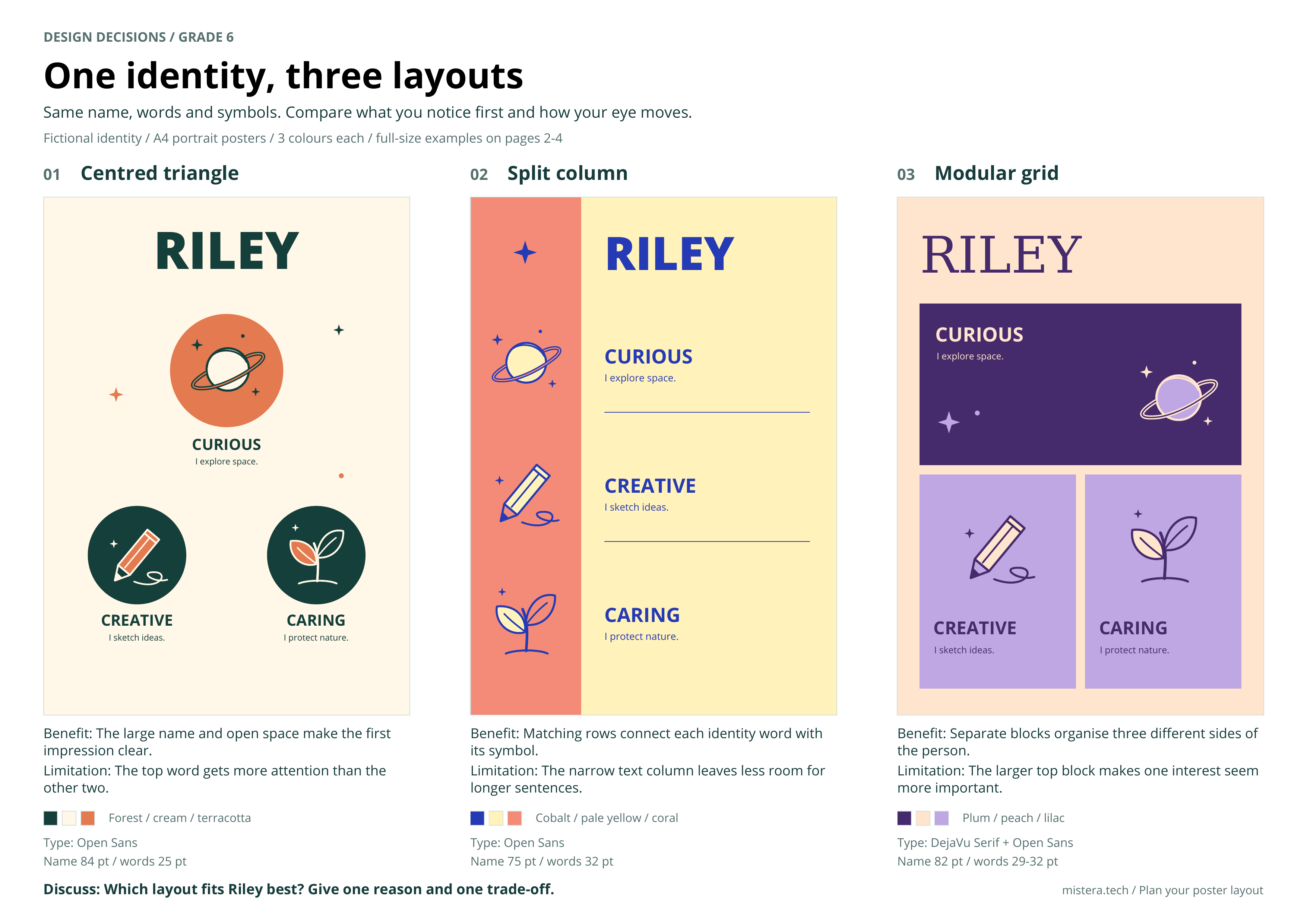
Use the examples to compare possibilities, then develop your own poster rather than copying Riley’s identity.
Develop one important part of your existing project and show the reasoning behind the next version.
Bring the current project, research sheet and earlier sketches. Complete this focused practice task in the first lessons after the holiday. Continue developing the full project during the summative.
Work through the sheet
Write in the editable handout or on the printed sheet. Add labelled sketches, screenshots or extra pages when you need them.
- 01
Write success requirements
Choose four priority requirements for the part you are developing. Link each to one research finding and say how you could check it. For example: all three identity words can be read on an A4 print held at arm’s length. Check by asking a partner to read them.
Keep: Four requirements with research links and a way to check each.
- 02
Draw three alternatives
Focus on your poster layout. Reuse earlier sketches where they show real alternatives, and add what is missing. Draw three small, meaningfully different ideas. Label how each helps the user and one practical limitation.
Keep: Three labelled sketches; add a separate page if needed.
- 03
Present your choice
Show the chosen design and explain why it is the best fit. Identify one advantage, one trade-off and one change you made after feedback. Keep genuine earlier evidence; do not invent a design history.
Keep: Chosen sketch and a reasoned decision.
- 04
Make the planning drawings
Make one clear labelled plan for your poster layout. Label the headline, identity words, images, approximate sizes, colours and type. List the files, tools or materials it needs. The summative will extend this plan to the complete project.
Keep: Labelled drawings or diagrams attached to this sheet.
Grading rubric · 8 points
Four evidence rows, each worth 0, 1 or 2 points. Total 8. This is a classroom practice score for the named A or B strands, not a complete MYP criterion achievement level. A row earns zero when no relevant evidence is shown.
| Evidence | 1 point | 2 points |
|---|---|---|
| Write success requirements | Requirements are mostly preferences or cannot be checked. | Requirements cover the project need and include a practical way to check success. |
| Draw three alternatives | Shows a limited set of ideas or differences are mainly cosmetic. | Shows three feasible alternatives with meaningful differences that can be understood. |
| Present your choice | Chooses a design but gives limited reasons or does not acknowledge a trade-off. | Presents the choice with evidence, a relevant trade-off and an explained refinement. |
| Make the planning drawings | Drawings show the idea but key labels or relationships are missing. | Drawings clearly communicate the chosen design and the details needed to interpret it. |
What to submit
Submit the completed worksheet and the editable poster file and an exported PDF or image to the specific Toddle assignment for this task. For research-only work, include the current project version and the research evidence; a new visual version is needed when you change the design.
Record the tool, what you asked, what you kept or changed, and how you checked it. If you did not use AI, write “No AI used”. Never invent sources, interviews or results.
Open Toddle →Related assignments
- Plan your poster layout
Bring the current project, research sheet and earlier sketches. Complete this focused practice task in the first lessons after the holiday. Continue developing the full project during the summative. Finish the focused practice sheet before the summative begins on 8 October.
Assignment on the calendar →
Submit in Toddle. The assignment instructions above specify what to hand in.